Bumping dependencies inside Dockerfiles
There are a ton of weird, non-standard places to manage dependencies that don’t work with software composition tools or package managers. Somehow I seem to find many of these reasons. Each made sense at the time and for the project … but had a hidden cost.
Departing from the “paved path” of a package manager means updating and maintaining that dependency becomes a manual process. The tools, like Dependabot, that assume all dependencies fit a particular pattern aren’t helpful anymore … at least not without some extra help.
Let’s start with automatically bumping dependencies inside of a Dockerfile build.
Use cases
There are lots of places for nasty dependencies to hide in a container’s build file. I see these icky dependencies in CI/CD builder or deployment images, big project builds, multi-language anything, and more. It’s hard for a human to remember to update it, harder for a human to go to each project to find the latest version, and even harder for them to read it and catch all of the updates. Toil is no fun.
1
2
3
4
5
6
7
8
9
10
11
12
13
14

FROM your-base-image:tag AS build

# install the runner
WORKDIR /actions-runner
RUN curl -fsSL https://github.com/actions/runner/releases/download/v2.337.0/actions-runner-linux-x64-2.337.0.tar.gz \
  | tar xzf -

# install the hooks
RUN git clone --depth 1 --branch v0.8.1 \
  https://github.com/actions/runner-container-hooks.git /tmp/hooks \
  && cd /tmp/hooks && npm ci && npm run build \
  && mv packages/k8s/dist /actions-runner/k8s && rm -rf /tmp/hooks

# do some other stuff
Dependabot will handle the FROM line … and that’s it. The documentation is straightforward about what it can and can’t do, just … it doesn’t fully fit what I need and what a lot of the teams I work with do too.
For my project, there are 7 separate images built weekly, each with 2 architectures. Each image has a handful of dependencies that it pulls in during the build. Some of those are git repos, some are git release assets, or binaries hosted on vendor websites … you get the idea. I can’t look up a handful of dependencies and open PRs opening them across a few different Dockerfiles all the time.
Let’s build a deterministic, reproducible system to keep these all up-to-date on a schedule. 🎉
Easy to read is easy to use
First, move all of the various versions and architectures and any other variable into arguments. I like to put all of the arguments at the top of the file, personally. That way, no matter how many times or where it’s used, everything is easy to find at the top. The other reasonable path is to put them near the thing they’re doing, such that arg_1 is nearer to the first time it’s used and arg_2 is nearer to the first time it’s used, and so on. Either are acceptable and easy to automate. Just pick one. :)
1
2
3
4
5
6
7
8
9
10
11
12
13
14
15
16
17
18
19
20

FROM your-base-image:tag AS build

# dependency arguments
ARG TARGETPLATFORM
ARG RUNNER_VERSION=2.337.0
ARG RUNNER_CONTAINER_HOOKS_VERSION=0.8.1

# install the runner (you change nothing to change the version)
RUN export ARCH=$(echo ${TARGETPLATFORM} | cut -d / -f2) \
  && if [ "$ARCH" = "amd64" ]; then export ARCH=x64 ; fi \
  && curl -L -o runner.tar.gz https://github.com/actions/runner/releases/download/v${RUNNER_VERSION}/actions-runner-linux-${ARCH}-${RUNNER_VERSION}.tar.gz \
  && tar xzf ./runner.tar.gz \
  && rm runner.tar.gz

# install the hooks (you change nothing to change the version)
RUN curl -f -L -o runner-container-hooks.zip https://github.com/actions/runner-container-hooks/releases/download/v${RUNNER_CONTAINER_HOOKS_VERSION}/actions-runner-hooks-k8s-${RUNNER_CONTAINER_HOOKS_VERSION}.zip \
  && unzip ./runner-container-hooks.zip -d ./k8s \
  && rm runner-container-hooks.zip

# whatever else needs to happen
Nowhere in here does this logic
- bundle dependencies together
- require uniform version strings like whether or not to use semver or to include the
vin front of the numbers or any other convention - care about where the git repo is hosted or binaries are stored
Instead, it’s only a simple string key=value pair that you can easily work with using string replacement in almost any language you’d like.
Write a script
Now write a script to do that string manipulation. For me, I have one script covering all my dependencies in a project (this script if you want to take a peek). It bundles together all of the dependency bumps across every file in scope in one pull request. The other reasonable path is to have one script and one PR per dependency or directory in a mono-repo. Either way works and factoring this is a personal choice.
This script(s) has to do a few tasks.
First, declare or read what files in the repo have dependencies to update. I chose to use Python and put a list up front. This way, it’ll loop over each one and do whatever’s needed by file.
1
2
3
4
5
6
7
8
9

DOCKERFILES = [
    "images/rootless-ubuntu-jammy.Dockerfile",
    "images/rootless-ubuntu-numbat.Dockerfile",
    "images/rootless-ubuntu-resolute.Dockerfile",
    "images/ubi10.Dockerfile",
    "images/ubi9.Dockerfile",
    "images/ubi8.Dockerfile",
    "images/wolfi.Dockerfile",
]
Then, let it check each upstream source for a new tag. In my case, I used a few functions based on how it updates, then used a caller function to tell it what to update with each time the function was called. From there, main() handled all the orchestration and file writing.
1
2
3
4
5
6
7
8
9
10
11
12
13
14
15
16
17
18
19
20

# the function to update a project where canonical source is a git repo
def _github_latest(repo: str) -> str:
    """Return the latest release tag_name for a GitHub repo (e.g. 'v2.333.0')."""
    data = json.loads(_fetch(f"https://api.github.com/repos/{repo}/releases/latest"))
    return data["tag_name"]

# the function that gets updates for each thing
def get_latest_versions() -> dict[str, str]:
    """Fetch and return the latest version string for each tracked ARG."""
    return {
        # strip leading 'v' — Dockerfiles store bare semver for these three
        "RUNNER_VERSION": _github_latest("actions/runner").lstrip("v"),
        "RUNNER_CONTAINER_HOOKS_VERSION": _github_latest(
            "actions/runner-container-hooks"
        ).lstrip("v"),
        "DUMB_INIT_VERSION": _github_latest("Yelp/dumb-init").lstrip("v"),
        # COMPOSE_VERSION keeps the 'v' prefix (matches existing Dockerfile convention)
        "COMPOSE_VERSION": _github_latest("docker/compose"),
        "DOCKER_VERSION": _docker_latest(),
    }
From here, there’s a function that updates the Dockerfile and main() to orchestrate it all.
There’s really nothing novel about string manipulation.
Write a workflow to call the script
Now return the info back to GitHub by calling it from Actions every so often.
1
2
3
4
5
6
7
8
9
10
11

on:
  workflow_dispatch: # allow manual runs
  schedule:
    - cron: "43 6 * * 6" # every Saturday at 6:43 AM UTC

jobs:
  update:
    runs-on: ubuntu-latest
    permissions:
      contents: write # to create a new branch with updates
      id-token: write # to get a new token for opening a PR
From here, the full workflow does the following steps in order.
- Checks out the repo
- Setup uv
- Run the script to update container dependencies
- Checks for changes between the script output and the git repo
- Sets the date for the PR branch name
- Commit and push to a new branch if there are changes
- Gets a new GitHub app token to make a PR (more on how I do that)
- Creates a pull request using GitHub’s API directly with
actions/github-script
GitHub Actions can’t start new checks off of a PR that it creates … directly. That’s partly why I use a GitHub app to open the PR. That allows one Action to kick off more Actions by opening a PR under that identity instead. This means I don’t have to do anything manually to start the CI tests.
Receive regular PRs
This script does one PR for all deps, but you can trivially change this to be one PR for each dependency too. Here’s an example PR that I get once a week now.
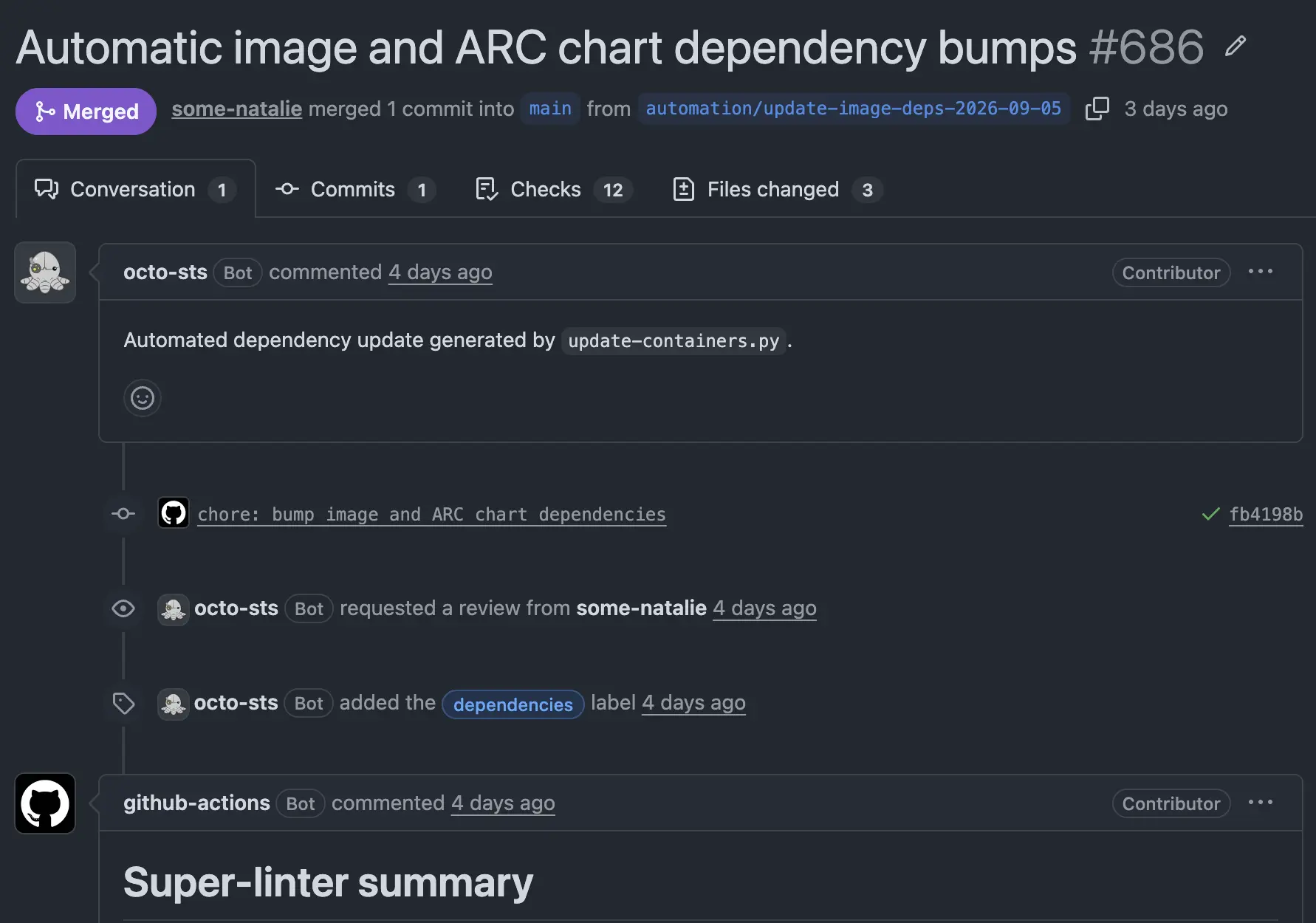
 an automated PR running automated tests, asking only for a human to review and merge
Scale to your project
“This works on my random little open source project” isn’t helpful.
A few small swaps on this workflow makes it a “big company” win. Use the internal proxy instead of the canonical upstream source, change GitHub/GitLab/etc as needed, then prompt your AI agent to “implement this pattern on this project and open a PR with the new script and workflow” with all the relevant public links. It was simple, it produces reliable results, and the update PRs with clean CI checks can get merged quickly.
Each workflow cost less than a dollar in tokens and a few minutes of human review. From here, the script it creates will deterministically keep that project up to date regularly.
Parting thoughts
I called this my “janky dependabot” when AI was running the whole update process, but this is much better. I ripped out the AI updates perhaps six months ago because it took 10+ minutes for AI to figure out the same deterministic few updates. Instead, it took a few minutes to write a boilerplate script and workflow to do the same thing in a few seconds each week. This was much more economical and reliable.
Spending time improving the updates of hard-to-manage dependencies is one of those rare tasks that is truly low cost to implement and high impact on a project’s security over time.