You didn't 'miss the boat' on AI in cybersecurity

This talk was first presented at the Boulder Secure AI & DevOps group on 20 April 2026.
The end goal is enough knowledge to (1) take some first steps on your own and (2) to see the path is worth exploring because there are tons of problems to solve still! You won’t leave an expert or have a deep dive into any particular problem. These are the slides with expanded writeup.
This talk took shape from two texts from two very different and dear people following Anthropic’s leaked Mythos model. It is reported to be so damned good at finding 0 day vulnerabilities that it can’t be released to the public for our own safety. Instead, a handful of vendors and partners get private preview access called Project Glasswing .
- “So you worried?” from a friend who’s at the top of his game in AI cybersecurity.
- “I guess I need to find a new career. Cybersecurity is dead now.” from another just barely out of school.
No, and no. And don’t rest easy.
Sales doesn’t help this feeling. Love, your pal in sales
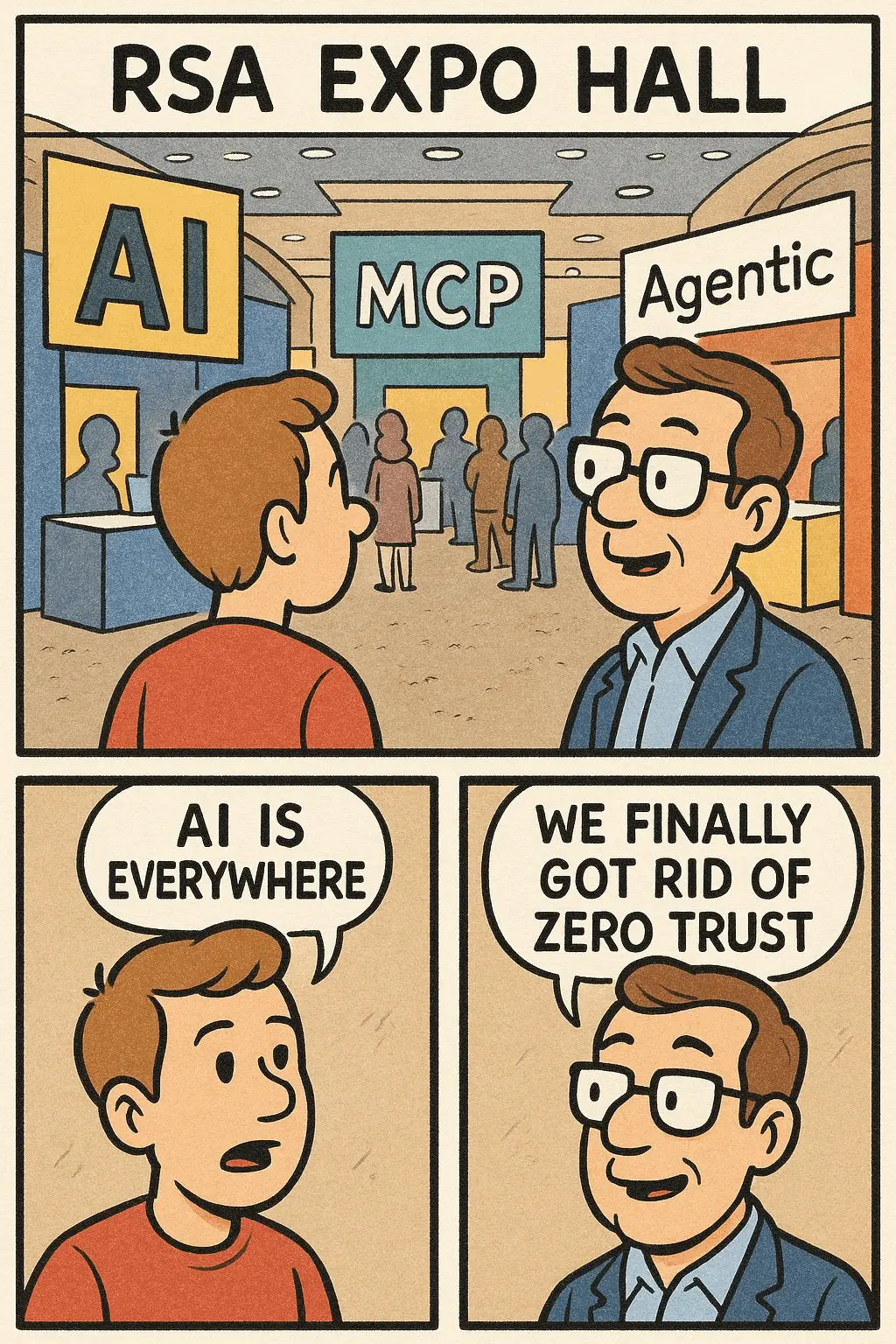
Let’s take the RSA Conference expo floor as an example.1 It was a confusing place.
- 1/3 was “AI + Red Team” and that meant any number of different things
- 1/3 was “AI + SOC” which also had a ton of varied meanings
- 1/3 was LITERALLY the rest of all cybersecurity things, most with AI
All of it, the millions of dollars spent to be there, is to drive urgency. The expo hall is a sales event. Companies spend money to hope to meet potential customers or investors or partners, not to educate out of pure goodwill.
THE FOMO IS REAL. THE END IS NIGH.
Fear won’t help you learn. You didn’t 🛶 “miss the boat.” 🛶
Every step along the way of AI presents new opportunities to learn, to exploit and secure, to build, and more. There’s always lots of room for more folks. 💖
I currently work in sales at a company building products with AI for cybersecurity. All opinions and snark are mine, not employers past/present/future.
We’re not talking about my work. We are talking about all of our jobs, in one way or another.2 The resources shared are free and/or open-source software that can be run locally unless otherwise noted.
Hardware
You don’t need to spend hundreds of dollars a month on cloud subscriptions to lease access to expensive hardware. You also don’t need a mortgage’s worth of hardware, either. Let’s get started at a few price points.3
Nothing - SaaS free tiers
No hardware here, but most companies offering AI in a software-as-a-service subscription have a free tier. It can be a pain to manage the rolling use limits of each type of way you get billed by each platform, but it does provide access to proprietary “frontier” models without paying money for them.
Extra small - a Raspberry Pi
A Raspberry Pi 5 with 8 GB of RAM can run quite a few smaller language models without any extra hardware. It uses the CPU for inference. Add the official add-on board, AI HAT+ 2 , and you get a dedicated neural processing unit (NPU). Similar to a graphics processor, the NPU is purpose-built for running models fast and efficiently. Obviously it won’t match the performance of enterprise datacenter hardware, but it does make real-time inference on small models practical.
There are tons of other embedded devices too, but the Raspberry Pi is by far the most common with the biggest community to lean on when things break. The Seeed Studio AI Kit tutorial walks through the HAT setup from scratch. The official Raspberry Pi AI page has a ton of starter projects too.
This isn’t an exercise in silliness - edge AI is booming across anything that needs a sensor from control systems to defense tech. Secure deployment and operations is a specialist field that combines AI security with running low-power devices in the field … that are becoming increasingly autonomous.
Small - a general purpose desktop
Your desktop - Linux, MacOS, or even Windows - can likely run some models too. How well depends on the hardware you’ve got. Many general-purpose or gaming computers with decent graphics cards do well here. Can I run AI? is a handy site to help match models to the hardware you’re working with.
Medium - a specialty desktop
Specialty desktops in the $1,500–$5,000 range punch well above their weight for AI workloads. The reason4 is almost always the same: unified versus discrete memory. A conventional gaming PC has fast CPU memory and fast GPU memory that are separate pools. Moving data between them can be a bottleneck. Giving the CPU and GPU access to the same large, fast pool. A larger pool means bigger models fit entirely in memory, which means faster inference and no swapping.
A few machines worth knowing about:
- Apple Mac mini / Mac Studio (M4 Pro or M4 Max)
- AMD Ryzen AI Max (“Strix Halo”) mini-PCs
- NVIDIA DGX Spark
Any of these will run the full current generation of open-weight models (more on this in a bit), which covers nearly everything to locally experiment with.
Large - dedicated datacenter hardware
Okay, so access to a datacenter and enterprise budget is way outside the scope of this.
When money is no an object, the hardware becomes ✨ amazing ✨ … more, better, faster, whatever measure you pick. However, it still needs to have reliable power, be under a lock/key to prevent it from growing feet and walking off, and preferably not get wet either.
The smaller hardware specs are running more or less the same software. Size doesn’t change the fundamentals of securing anything. 🤷🏻♀️
The security principles are the same regardless of hardware size, even if the scale is different. Workload isolation, data governance, and physically securing your hardware all still matter.
Software
There’s more depth here than I can cover in an evening. The AI Engineering learning path is a solid map if you want to go further. Let’s quickly talk about finding and running open models that are already built and trained. It’ll cover enough to get started.
Language models aren’t magic
A language model predicts the most probable next token (chunk of text), given some of what’s immediately before it. I think of it as multi-dimensional plinko — a token bounces through a weighted graph with hundreds of billions of edges and most often lands on the most likely next word. 3Blue1Brown has a short intro video and longer video , both explain it well visually.
Frontier models (OpenAI, Anthropic, and others) are proprietary and accessed via an API or client, but can’t be run on your own hardware. Open-weight models (Llama, Mistral, Gemma, and more) ship the weights so it’s possible to run, fine-tune, and inspect them locally. We’re focusing on open-weight models to stay local.
If you do change the open model, your changes aren’t automatically public. Those changes are intellectual property that can be protected. Weight theft is the practice of using the model and extracting responses so as to copy proprietary configurations. The RAND Corporation published a paper, Securing AI Model Weights , on the topic that is worth reading to get started here.
Even if the weights are open, the system prompt doesn’t have to be. It’s what provides the basis for how the model responds to you. It’s a long way to say “don’t be evil”, but can also give guidance on tone or depth of response. It is frequently secret, and the model is directed to not give it to you. There’s an entire GitHub repository full of leaked prompts from various closed models, as well as entire problems around protecting it.
Benchmarks measure standardized test sets and can be easy to game . These can be general-purpose tests or specialized by what you want to actually do. I wrote a very simple benchmark script to help me match models that perform well to the hardware I have. It outputs a few performance metrics and the prompt’s response.
1
2
3
4
5
6
7
8
9
10
11
12
13
14
15
16
17
18
19
20
21
22
23

$ uv run main.py --verbose --prompts "list" "of" "prompts" "to" "test"

Verbose: True
Skip models: []
Prompts: ['why are some cats calico colored?', 'why is the sky blue?', 'explain kafka message queues like I am 5 years old.']
Evaluating models: ['gpt-oss:20b']

:: RESPONSES OMITTED FOR LENGTH ::

----------------------------------------------------
        gpt-oss:20b
            Prompt eval: 914.01 t/s
            Response: 51.81 t/s
            Total: 55.50 t/s

        Stats:
            Prompt tokens: 228
            Response tokens: 3007
            Model load time: 0.35s
            Prompt eval time: 0.25s
            Response time: 58.03s
            Total time: 59.22s
----------------------------------------------------
Building an application with some sort of model takes user input and runs it, introducing yet another class of security problems, prompt injection. Unlike SQL injection or cross-site scripting (XSS), there’s no reliable “sanitization” of user input yet. The same channel that carries your legitimate instructions can also carry hostile instructions. It’s hard for the model to consistently tell them apart. That risk compounds quickly with agentic setups where a model can browse or read/write files, launch other programs, or call APIs. A malicious website can instruct the model to forward your data somewhere, and it might just comply. That instruction can be indirect too, where an attacker doesn’t talk to the model directly but plants instructions into content the model reads later, like a support ticket or attached document. For offensive work, it’s a novel pivot to get your payload into any document or page a target’s AI agent touches, and you’re issuing instructions directly to their automation.
Input filtering, output monitoring, and system-prompt hardening all help, but none are comprehensive enough to call the problem solved. Language models, even open ones, present their own unique security risks.
Finding models
There are three big repositories of open models to know, Ollama’s model library and Hugging Face and LM Studio . Most of what’s on Hugging Face is a GGUF file, a big binary of quantized weights . This means you’ll need to take an extra step5 to add a system prompt to it. Ollama and LM Studio are a little simpler to use for they’ll run the model in one step instead. Under the hood it’s all tarballs of model layers … basically the same mental model as Docker images. It also brings the same problems as pulling and running other opaque binary assets over the internet. 🫠
Software supply chain concerns aren’t going away anytime soon. OpenSSF Model Signing is extending software supply chain tooling to ML artifacts, but adoption is still early. A model file from the internet is an unsigned binary with no standard verification story … yet.
Running models
Ollama (GitHub ) is a simple GUI that handles downloads, quantization, and a local OpenAI-compatible API. Anything that works with OpenAI’s API works with Ollama by changing the base URL. llama.cpp is the engine underneath. It’s worth knowing directly if you’re on AMD hardware or need cutting-edge accelerator support (CUDA, Metal, Vulkan, ROCm). There are other model runtimes as well, but this should help get you started.
Running a model is still a server process, not too unlike a container. Securing access to that service is just as important as any other process.
Adding some custom data
Now let’s build something simple on top of a running model. It’s helpful to have “AI applications” retrieve relevant information before handing a question to a model. Most commonly referred to as ✨ sparkling search ✨ retrieval-augmented generation (RAG) , it allows us to customize the results by searching a set amount of data first.
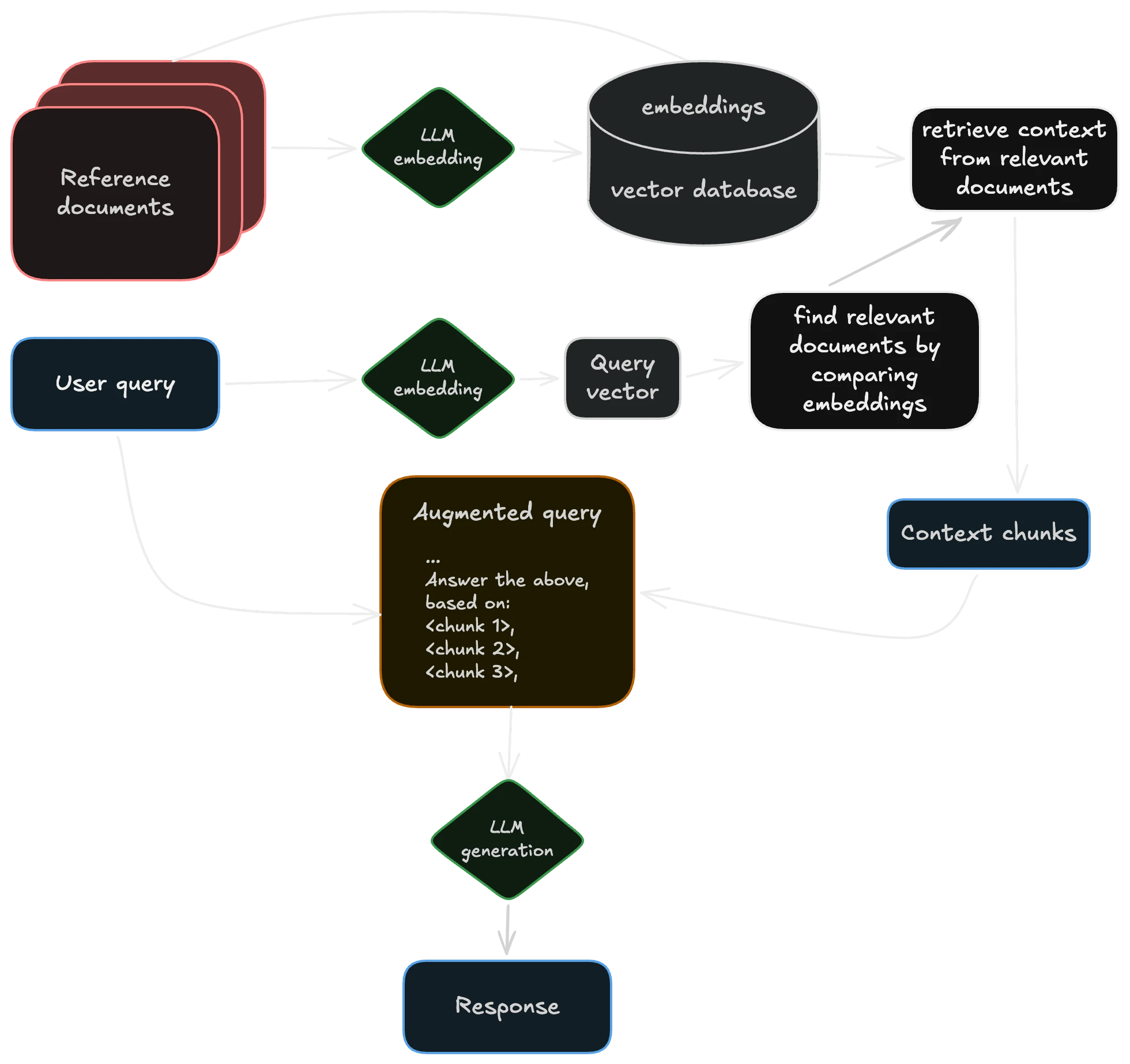
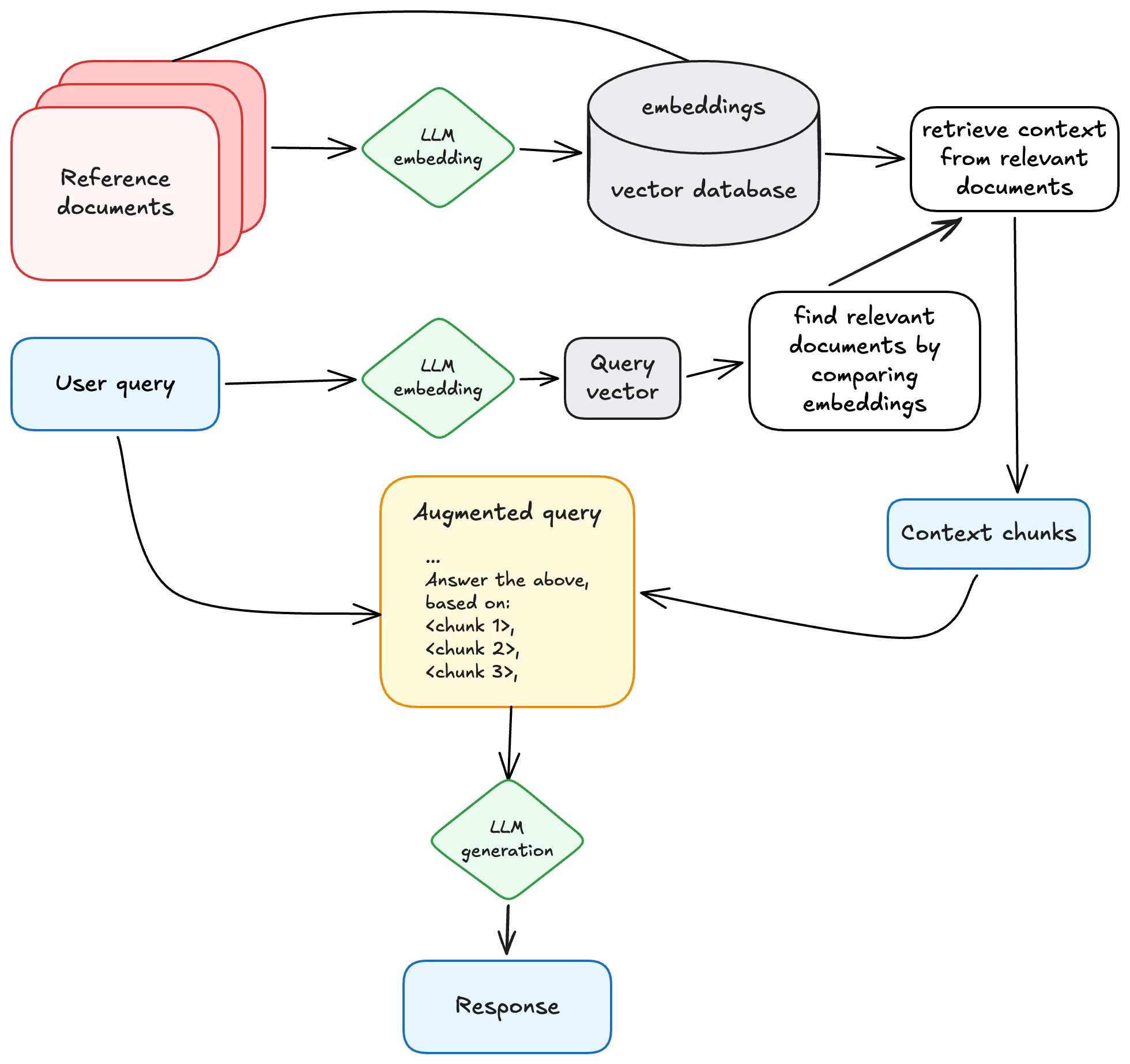 a typical architecture for retrieval-augmented generation (RAG), inspired by Wikipedia
The storage layer for all of that extra context is usually a vector database. Instead of rows and SQL, you store numerical representations of meaning and query by similarity. These add context to the user’s prompt to aid in the response. There are a lot of open source vector databases to choose from. A vector database is still a database with many of the same boring problems. Sensitive documents (customer data, security findings, etc.) can carry information about the source material even after the originals are deleted.
Most vector DBs support metadata filtering, role-based controls, and a ton of other security features … so learn them and use them thoughtfully.
Even a simple CRUD6 application handling basic business logic becomes more complex to secure than any component on its own. The document store and embedding index are high-value targets. Poisoning the retrieved data or changing the prompt via injection into the retrieved context can manipulate model outputs at query time without touching the model itself. Malicious documents embed text/content in a document to hijack the model’s instructions when that document lands in context. Users can surface documents they shouldn’t have permission to read simply by crafting queries that match restricted content without proper access control.
We’ve got to figure out the full attack surface of their underlying LLM, configuring that database’s access, and several more components now too. There’s lots to learn and lots for a security-minded engineer to do.
Using AI locally
Now that we’ve got something working locally and a grasp of the security problems, here’s a few ways I use local AI in my day-to-day workflow.
A chatbot
My chatbot is pretty helpful. I use Open WebUI in offline mode to draft explanations and “friendly” responses to FAQs without accessing irrelevant or restricted data or having anything leave my laptop. There are way more options than I could cover in a night, but the docs are fantastic.
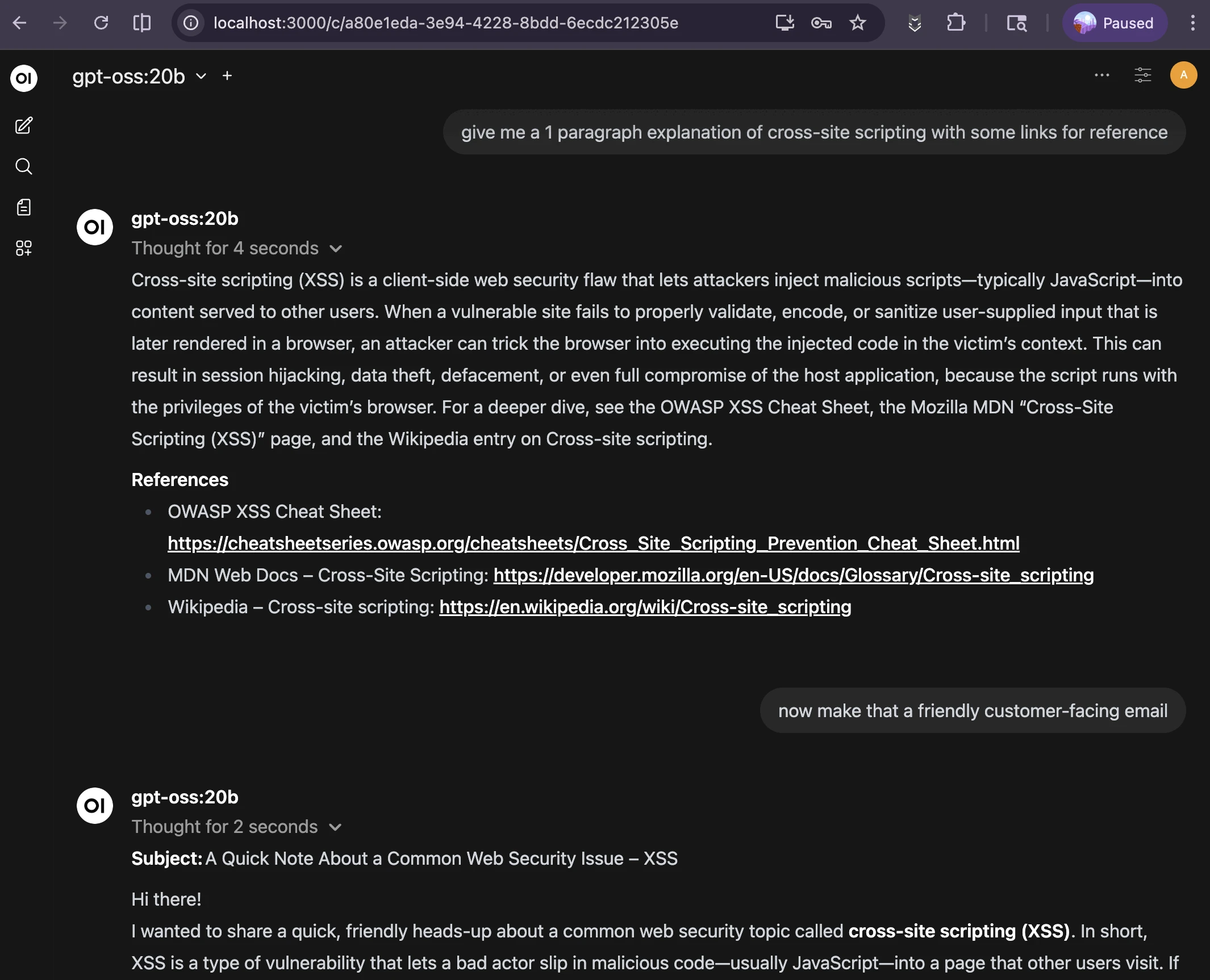
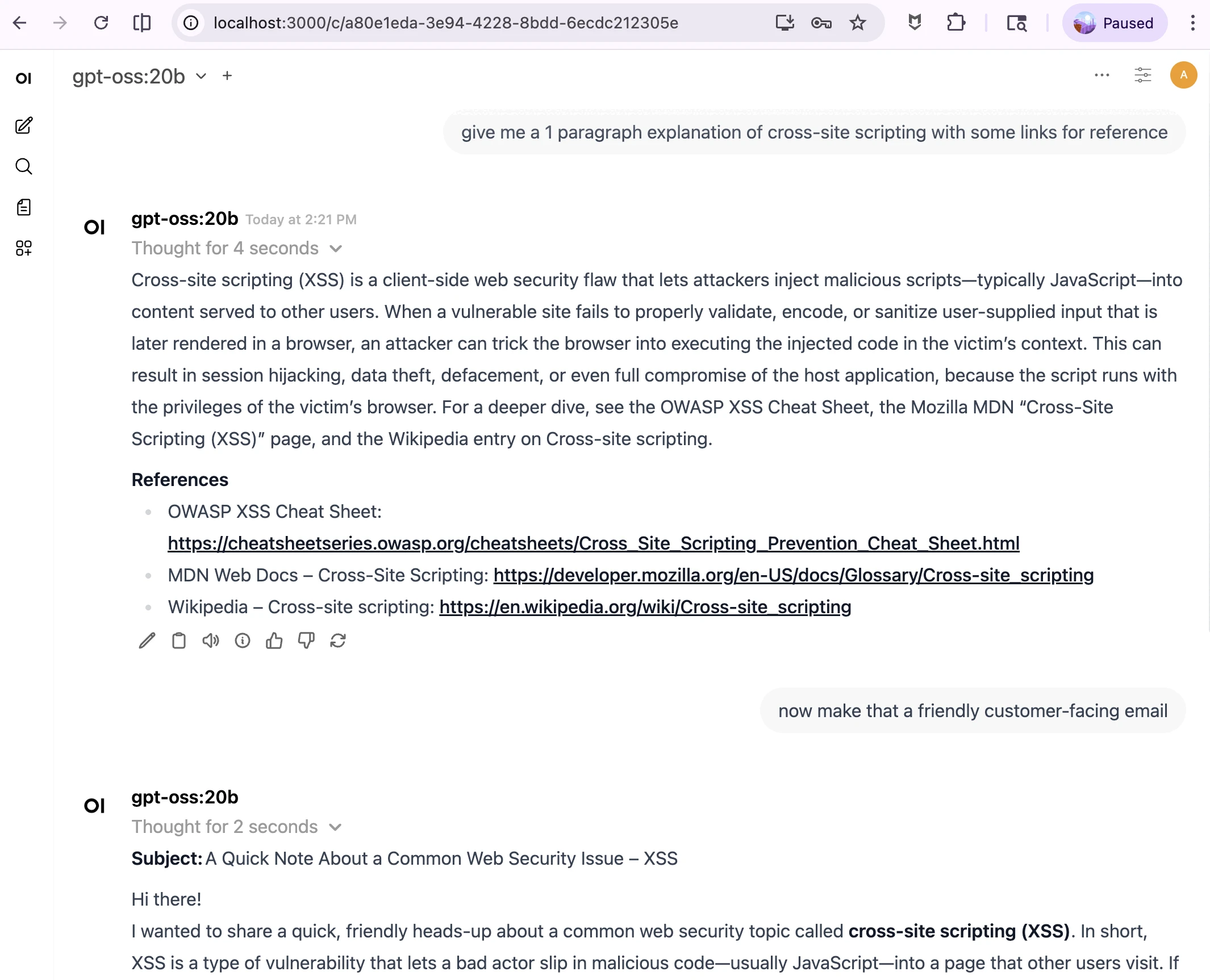 local chatbot starting a draft for a customer-facing response, a bit *too* verbose still
The next improvement is to add some custom data or a prompt to make it more helpful for your tasks. For me, I’ve always had a few “copy/paste” responses, but much of my emails are 80% similar and 20% different. Having a starting draft of an email and editing the last bit for the majority of “it doesn’t really matter” emails is quite a time saver … with a few caveats.
- Always look it over. Edit as needed, verify that all links work as expected, it’s factually correct, etc.
- Be okay getting called out on boilerplate responses. 🤷🏻♀️
- It’s not succinct. Sometimes you’ve got to tell it to be brief.
- “Show your sources” has a date limit of the training data. That date can be pretty far back for the open models, so try not to do anything recent.
- Adding additional data or context helps a lot. Good ideas include developer docs for the stack, the original email/question, past emails you’ve sent, and any other public info.
Data seems to matter more than the specific model or size of the compute, making this a great place to start.
🔐 Just don’t forget to lock down access to both it and the data source you use.
A harness or pipeline
I haven’t gotten much use out of the popular AI agent harnesses like gastown , openclaw , etc. They don’t fit how I work personally. Instead, I use small discrete scripts for tightly-scoped workflows.
Let’s make a simple bash pipeline together.
To start with, get a list of findings from your tool of choice. Almost every security tool ever has an API or other way to export findings. I omitted this step because it’s specific to your tool stack, but I’ve run this with JSON, CSV, and SARIF files successfully.
We’ll analyze this set of findings and pull out the most impactful ones. Full code in GitHub .
Next, do some setup in the shell script.
1
2
3
4
5
6
7
8
9

#!/usr/bin/env bash
set -euo pipefail

FINDINGS_FILE="${1:?Usage: $0 <findings_file> [logs_dir]}"
LOGS_DIR="${2:-}"
OUTDIR="$(mktemp -d findings_report_XXXXXX)"
KEV_URL="https://www.cisa.gov/sites/default/files/feeds/known_exploited_vulnerabilities.json"
MODEL="gpt-oss:20b"
OLLAMA_BASE="${OLLAMA_HOST:-http://localhost:11434}"
From here, it’s a simple set of prompts inside shell functions to iterate through on a couple steps, like so:
flowchart LR
  A([Start:\nFindings List]) --> B[Iterate over findings\nselect top 5 impactful\nignoring CVSS scores]
  B --> D[Review associated\nlogs per finding for\ncreative/novel technique]
  D --> H[Check package\nmanifest findings for\nCVEs in CISA KEV list]
  H --> L([Finish: Build report\nand summary])
If it sounds a lot like building literally any other CI/CD pipeline for devops or ETL pipeline for data … it’s because this is not that different. We’re taking a ton of findings or other data and creating a summary.
1
2
3
4
5
6
7
8
9
10
11
12

ᐅ ./findings_pipeline_ollama.sh Code/brokencrystals-o11y/sarif/semgrep.sarif
[1/4] Identifying top 5 most impactful findings...
   -> findings_report_ujB0mu/step1_top5.md
[2/4] Reviewing logs for creativity / novelty...
   -> findings_report_ujB0mu/step2_logs.md
[3/4] Cross-referencing package manifest findings against CISA KEV...
   Fetching KEV catalog...
   -> findings_report_ujB0mu/step3_kev.md
[4/4] Generating talking points...
   -> findings_report_ujB0mu/talking_points.md

Done. Report: findings_report_ujB0mu/report.md
The full report, talking points summary, and more are in this GitHub repo .
While it doesn’t replace expert analysts, AI is pretty efficient and reasonably good at making a
tl;drsummary of a large volume of data. You still have to tell it what to look for though.
Now we have pipelines, what do we put in them?

Nature keeps evolving crabs. No, really! At least five separate times over the course of evolution, a critter has faced a survival problem where natural selection gave them a hard shell on top and legs for moving sideways, called carcinisation .
When faced with the same problem, many teams build near-identical solutions …
… which then manifests as crabs any trade show’s vendor floor being a few hyped product categories …
Snark aside, we now have the framework to build a lot of cool new stuff!
- Many penetration test tools are straightforward for enumeration, exploration, and exploitation. Chaining predictable inputs and outputs together makes “commodity” testing a lot simpler.7
- Fuzzing, the practice of sending tons of random data into a program to watch how it reacts, can focus more on likely problem areas.
-
Vulnerability hunting and triage in existing codebases also follows the
input -> logic -> outputpattern and can be automated. Finding a pattern at scale is what these systems are good at.8 - Dynamic and static analysis tooling has a much larger set of trends to pull from to match problematic patterns.
- The same is true of threat detection and response, insider risk indicators, and so much more.
This gets us started, maybe even going further than “learning on my laptop” territory. While it’s true most of the “true enterprise products™️” have more features to make it easy to use, meet compliance needs, integrate with other stuff, etc., that doesn’t mean you need all of them all the time. Run the same “build it or buy it” math here, as much as any other system for business.
Cybersecurity is a human problem
Excitement aside, security is a human problem. Each shiny new tech is used by people, with people’s weaknesses and strengths and intentions, for some people-centered purpose.
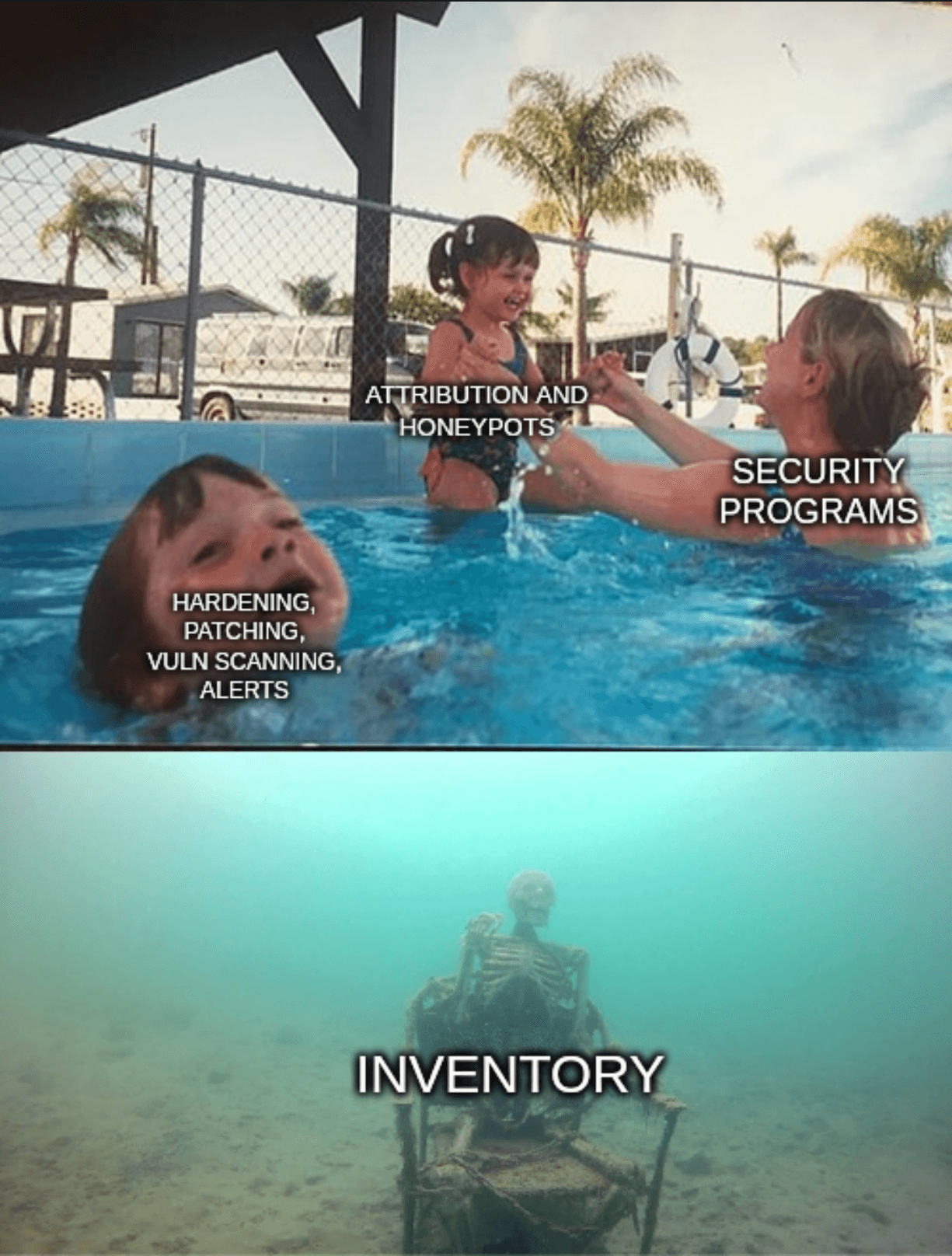
AI adds another shiny new technology into cybersecurity without fixing the boring problems.
Shipping code faster is great. If it’s never inventoried or scanned or maintained or <insert verb here>, did you fix more problems than you created? 🤔
If vulnerability research is faster, then exploit development is now equally faster. When much of the world can’t update at the same speed, the unpatched time to attack is widening.
It’s easier than it has ever been to create a maliciously similar website or app to steal credentials. Social engineering with fake personas is simpler to do and scalable beyond a few identities per human. Creating imposter videos or audio in real time is possible and cheap. While there is a new product category for “AI detection in <text/audio/video/more>”, it’s brand new and has so much development yet to do.
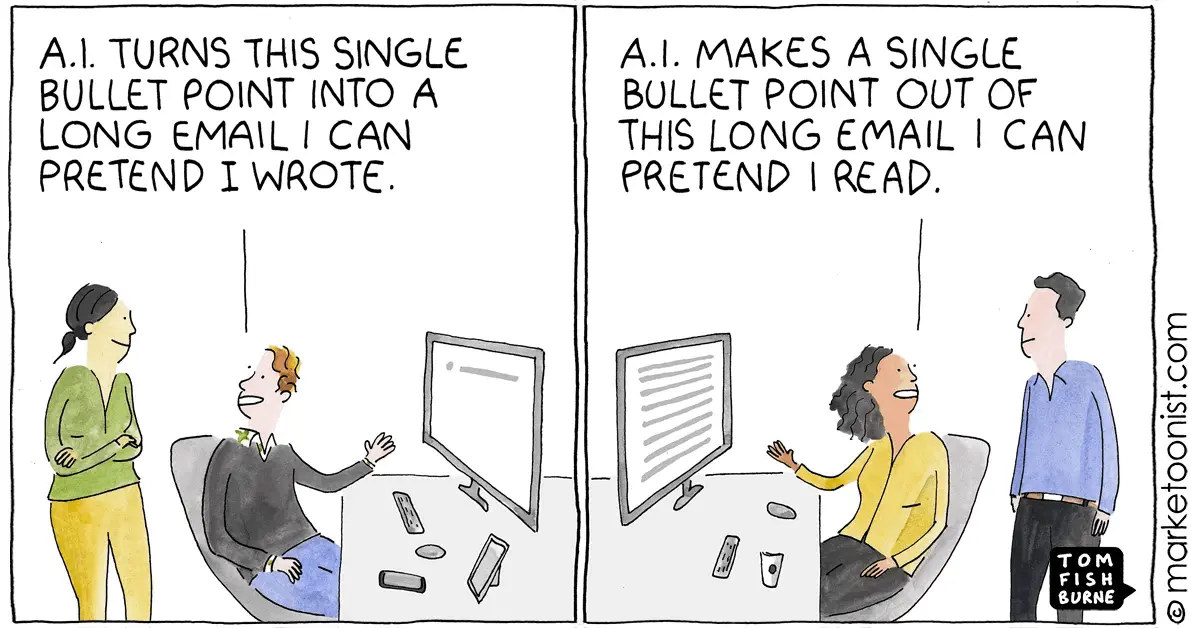
Imagine how much context and nuance was lost in the comic above. It could have been important. Indeed, that message could be the perfect phishing email, or have malicious content to corrupt the reading AI, or secretly download malware.
People haven’t changed, only the tools they use have.
The economics change again

This chart shows the number of hours a human would need to work to purchase a thousand Lumen-hours of light (brighter light is more expensive). It’s from a 1996 paper (PDF ) by economist William Nordhaus entitled Do Real-Output and Real-Wage Measures Capture Reality? The History of Lighting Suggests Not. The entire paper is worth the read. The takeaway is that the Consumer Price Index, how economists measure affordability, doesn’t evenly account for technology advances impacting our quality of life.
✨ AI is not a millenia-changing inflection point. ✨
Light from a wood fire is expensive when you have to do everything from harvest the trees to tend the fire each night. It got cheap at candles, then cheaper still on oil lamps and kerosene lamps and incandescent bulbs. This paper was published before LED bulbs became common, further compounding these gains.
Information is getting incrementally cheaper to use too. Perhaps that inflection is the invention of an adding machine, or perhaps it’s a silicon processor. Or magnetic storage medium like cassette tapes or floppy disks or hard drives. Somewhere in that huge downward trend line, machine learning and large language models “jump” in applied predictive use of huge data sets - making it cheaper to find some value in more data than a human could ever experience in several lifetimes.
Changing the economics doesn’t change the problem, only what we can use to address it.
Conclusion

Just like the slaying the Hydra , solving one problem makes several more to solve.
Maybe the days of a comfortable living made from knowing the top 20 metasploit modules are over soon. My CompTIA certifications don’t expire, so they’re at least 15 years from relevancy. In my career, I have learned how to
- Configure SCSI disk chains with jumpers
- Troubleshoot token ring networks
- Make coaxial cables and different types of ethernet cables from a cable spool with hand tools9
- Run around with floppy disks of Ghost to reset lab machines
Exactly none of this is relevant to technology today. 🤷🏻♀️
Don’t let anyone take the joy of learning from you, especially not a “faster better guess-the-next-word” machine. Remember that magpie advocates, sellers of the latest trendy tool, and random folks with huge internet followings have an agenda to spend your attention too. ✨ Fuck all of that. ✨
The constant change and learning is the most intriguing part of the field. Stick around for just a bit, and you too will acquire a list of once-critical and now-useless skills. Lean in to what you want to learn - personally, professionally, or both. Ask yourself regularly “Am I done learning here?”. Most of our time is spent at work. It’s normal to learn at work and have that drive each career choice you make.
🛶 You didn't "miss the boat" or start too late. 🛶
🌱 I hope this helps you get started. 🌱
😊 Now, go hack some shit! 😊

Generative AI was used to make some of the images used in this presentation. That’s it.
Footnotes
-
RSA 2026: The Great Cooking goes over each of the 649 exhibitors with a cutting commentary on how easy it’d be to redo the whole business with some vibe coding tools. ↩
-
I can’t address or apologize for the environmental and real harm to livelihoods that generative AI has had. Even after any 🔜 impending financial collapse 📉, the genie isn’t going back in the bottle. Fair or not, technology won’t “uninvent” itself and I choose to find a path forward in my career. ↩
-
It warms my heart to see SO MUCH ENGINEERING WORK go into moving off a SaaS / rented platform and into something it’s possible to own and operate offline. ↩
-
Discrete vs unified graphics is a funny thing, since the difference in memory speed and bus speed tilted performance heavily to discrete graphics years ago. ↩
-
Yeah, it’s a one-line
Modelfile(FROM ./my-model.gguf), thenollama createandollama run. Ollama prioritizes simplicity. ↩ -
CRUD applications Create, Read, Update, and Delete data. It’s an acronym for typical data ↩
-
I work at an “AI + Pentest” company at the time of presenting this. It’s a hot market. There’s probably a new VC-funded company or open-source project to do this every week. ↩
-
Some good reading on this: Vulnerability research is cooked and Vulnerability research isn’t cooked, it’s burned beyond recognition . ↩
-
This is still really handy, just for the homelab. I haven’t been inside a datacenter or run cable in the field in years. ↩